
Creating a Review Request Template That Works: Examples and a Practical Guide
What if the review request that earns trust is the one that asks for the least? Creating a review request template that works isn’t about finding a clever phrase or nudging customers toward praise. It’s about making an honest response easy to share while leaving the choice entirely up to them.
If you’ve hesitated over wording that might sound pushy, or remembered to ask only some customers, you’re not alone. A simple, repeatable process can help you ask at a natural point after service without filtering who receives the request or offering an incentive. Platform rules can differ, too, so don’t assume one message is suitable for every site.
This guide includes adaptable email and text examples, along with practical ways to choose timing and channel. You’ll also learn how to personalize a request, keep it clear and optional, and build a consistent follow-up routine that respects customer trust and platform policies. The goal isn’t perfect reviews. It’s feedback that reflects real customer experiences and is gathered in a way you can stand behind.
Key Takeaways
- Learn what makes creating a review request template that works clear, respectful, and easy for customers to respond to.
- Compare adaptable email, text, and in-person scripts to choose a format that fits the interaction and customer preference.
- Personalize each request without steering customers toward a particular rating or comment.
- Build a repeatable workflow that records when a service is complete and sends requests consistently to eligible customers.
- Use automation to support timely requests while keeping the invitation genuine and feedback voluntary.
What makes a review request template work for real customers?
A review request template works when it offers a brief, timely invitation to describe a completed service or interaction. Clear wording makes it easier for a customer to respond, but it can’t guarantee a review or a positive rating. The aim is an open invitation, not a particular outcome.
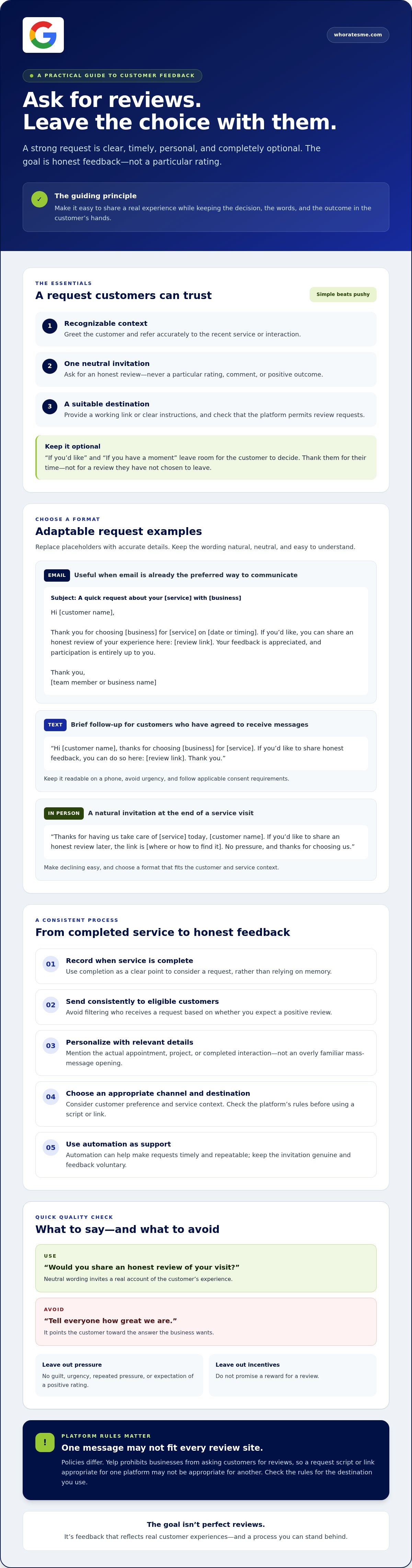
A user review gives people a way to describe their experience and helps others evaluate a product or service. That purpose should shape your wording. Ask what the customer thinks, rather than asking them to praise the business. “Would you share an honest review of your visit?” is neutral. “Tell everyone how great we are” points to the answer you want.
That distinction is central to creating a review request template that works. A useful template reduces friction while leaving customers in control of what they say, whether they respond, and where they share their feedback.
Which elements should every review request include?
Make the message easy to recognize and act on. Include the essentials, then remove anything that distracts from the invitation:
- A personal greeting and a brief, accurate reference to the recent service or interaction, such as “Thanks for choosing us for your plumbing repair.”
- One clear, neutral invitation to share an honest review, without asking for a particular rating or comment.
- The correct review destination, with a working link or clear instructions. Check that the platform permits review requests. Rules vary, so one destination or script may not suit every platform.
For example: “Hi Jordan, thanks for having us service your furnace. If you’d like, you can share an honest review here: [link]. We appreciate your time.” The customer can see what the request relates to and what to do next, without being told what to write.
What makes a request feel personal rather than pushy?
Personalization comes from relevant context, not excessive familiarity. Mention the actual appointment, project, or completed interaction instead of using a generic mass-message opening. Keep participation optional. “If you have a moment” gives the customer room to decide. Avoid guilt, urgency, repeated pressure, or wording that implies a positive rating is expected.
Close with simple appreciation, not a reminder of how much a review would help your business. “Thanks for your time” is enough. A respectful request welcomes feedback that reflects the customer’s real experience, even when it isn’t perfect.
Review request templates for email, text, and in-person follow-up
A script is a starting point, not a line customers must answer in a particular way. Replace the placeholders with accurate details, choose a destination that permits review requests, and keep the invitation neutral. These examples welcome honest feedback and make participation optional.
Email review request template
Email can work well when you already communicate with the customer that way or when they may prefer to open a link later. Use a clear, accurate subject line, then keep the message focused on the completed service.
Subject: A quick request about your [service] with [business]
Hi [customer name],
Thank you for choosing [business] for [service] on [date or timing]. If you’d like, you can share an honest review of your experience here: [review link]. Your feedback is appreciated, and participation is entirely up to you.
Thank you,
[team member or business name]
Use one relevant destination and test the link before sending. Don’t promise a reward or suggest that the customer should leave a positive rating.
Text message and in-person request examples
A text may suit a customer who has agreed to receive messages and expects a brief follow-up. Keep it readable on a phone, avoid urgency, and follow applicable consent requirements. An in-person invitation may feel natural at the end of a service visit, but make it easy for the customer to decline.
- Text: Hi [customer name], thanks for choosing [business] for [service]. If you’d like to share honest feedback, you can do so here: [review link]. Thank you.
- In person: “Thanks for having us take care of [service] today, [customer name]. If you’d like to share an honest review later, the link is [where or how to find it]. No pressure, and thanks for choosing us.”
Choose the channel that fits the customer’s preferences and the service context. Don’t send the same message to everyone through every channel. Platform policies differ, too. For example, Yelp prohibits businesses from asking customers for reviews, so a script and link suitable for one platform may not be appropriate for another. Check the FTC guidelines for soliciting reviews and the destination platform’s current policies before using a template.
If you’re refining wording for Google, see this guide on how to ask for a Google review. A consistent workflow can also help you send the appropriate message at the right point. WhoRatesMe’s ActivCycle automation supports customer feedback workflows.
Why timing, personalization, and channel choice change the response
A request is easier to understand when it arrives close enough to the service for the customer to connect it to a specific interaction. The right timing depends on the work. A completed appointment may be straightforward to follow up on, while a project with an outcome that takes time to assess may call for a later request. Treat timing as a considered choice, not a shortcut to guaranteed reviews.
TrustPulse’s guidance on building a customer feedback program that works emphasizes asking after an interaction and choosing channels that fit the situation. Use that as a starting point, then consider when the customer can fairly reflect on the service. One courteous request is usually clearer than a string of reminders. Repeated prompts can make an optional invitation feel like an obligation.
When should a business send a review request?
Anchor the request to a meaningful milestone: the service is complete, the appointment has ended, or the customer has had a reasonable chance to experience the outcome. A request sent before that point may come too early. One sent much later may be harder to connect with the interaction. Choose a consistent timing rule that fits the service, then review it if customers regularly need more time.
How should a business choose the right channel?
Let the customer relationship guide the channel. Email can suit a follow-up that includes context or a link the customer can open later. Text may be convenient when the customer has shared their number for that kind of communication and expects brief updates. An in-person invitation can feel natural at the end of a face-to-face service, but it should be easy to decline. Avoid a channel that would feel unexpected or intrusive.
- Email: Useful when email is already part of the service conversation and the customer may want to respond later.
- Text: Convenient for a short message, provided you respect the customer’s communication preferences and applicable consent requirements.
- In person: Suited to a natural handoff. Explain where to leave feedback and don’t pressure the customer to do so immediately.
Personalize the context, not the customer’s opinion. Mention the service or interaction accurately, but don’t ask the customer to highlight specific staff, details, or praise. That keeps the invitation relevant without steering the content of the review. As you refine the process for different customer touchpoints, the customer feedback automation guide offers broader workflow ideas. Thoughtful timing and channel selection strengthen creating a review request template that works, while leaving the decision and the feedback itself with the customer.
How to adapt a template while keeping review requests compliant
A template is a starting point, not a substitute for a fair process. Keep each request honest, optional, and consistent for customers whose interactions meet the same criteria. Don’t send requests only to people you expect to be satisfied, offer a reward for a review, ask for a positive rating, or suggest changing honest feedback. These safeguards protect the value of the feedback and the trust behind it.
Use this five-step check before sending a request:
- Confirm the interaction. Make sure the service or meaningful customer interaction is complete and that your message describes it accurately.
- Choose an appropriate channel. Use a channel that fits the customer relationship and their communication preferences.
- Personalize the context. Add the customer’s name, if appropriate, and mention the service. Don’t tell them what details or sentiment to include.
- Review the wording and destination. Check that the invitation is optional, neutral, and free of promises or pressure. Confirm the link opens the intended platform and business profile.
- Send consistently. Apply the same eligibility criteria regardless of whether you expect positive, mixed, or negative feedback.
How can a template stay neutral and authentic?
Use language such as, “If you’d like, please share an honest account of your experience.” Avoid phrases like “Tell us what you loved” or requests for a specific star rating. Don’t tie the request to a benefit, continued service, or special follow-up. A consistent process invites a broader range of experiences because satisfaction doesn’t determine who receives the request.
For more on avoiding selective solicitation, see this guide to non-gated review platforms. Review platforms can set different rules, so check each platform’s current policy before choosing a destination or adapting your message. Don’t assume a template allowed on one site is suitable for another.
What should businesses check before sending?
Read the message from the customer’s point of view. Is the service reference correct? Is it clear that responding is optional? Does the link open the right business profile? Does the wording invite honest feedback without steering the response? Confirm these details and check current platform guidance before sending, especially if you change the channel or destination.
Creating a review request template that works depends on both the wording and the routine behind it. WhoRatesMe’s Elevate Google-compliant plan may suit businesses looking to support review requests with a compliance-focused approach.
Turn a review request template into a consistent customer feedback process
A well-written template helps, but consistency comes from knowing when to use it and what happens next. Keep a simple record for each completed interaction: the service completion date, planned request timing, chosen channel, and whether a follow-up is appropriate. Set a clear limit for follow-ups so customers don’t receive repeated prompts. Apply the same process to eligible customers instead of choosing whom to ask based on how satisfied you think they are.
A simple three-step review request workflow
- Confirm the interaction and channel. Check that the service is complete, the customer details are accurate, and the selected channel fits the customer’s preferences and communication history.
- Personalize and send. Use the approved template, adding only relevant context such as the service provided. Invite an honest review, make participation optional, and use the correct platform destination.
- Monitor and respond thoughtfully. Record whether the request was sent and respect your follow-up limit. If feedback arrives, review it and respond with care. Keep the invitation process consistent. Don’t exclude customers because you anticipate criticism.
This routine helps you see where requests are being missed without making the message feel like an impersonal script. A brief log or shared workflow can track the essentials and keep the same neutral invitation in use.
When can review request automation help?
Automation can support repeatable tasks, such as organizing feedback workflows and helping requests go out consistently. It shouldn’t replace a genuine message or decide which customers deserve an invitation. Keep a person responsible for checking interaction details, channel, message, and destination, and for responding to feedback with context.
WhoRatesMe’s ActivCycle automation supports customer feedback workflows. Its review management service also includes centralized management across review platforms and a dedicated mobile app. For businesses seeking a Google-focused approach, the Elevate Google-compliant plan may be relevant once the request process and safeguards are in place. These tools support the workflow; they don’t change the principle that each customer should be invited to share their own honest experience.
If you want support managing an ethical review process, explore WhoRatesMe. Creating a review request template that works is the starting point. A consistent, thoughtful process helps keep the invitation clear and customer feedback authentic.
Make honest feedback part of your routine
A review request works best as part of a thoughtful process: connect it to a completed interaction, choose a suitable channel, and invite honest feedback without pressure. A clear template saves time, but consistency comes from applying the same fair criteria to eligible customers and respecting their choice to respond or not.
Automation can help organize that process while preserving a genuine customer experience. WhoRatesMe’s ActivCycle supports feedback collection and management workflows, and its Elevate plan is described as Google-compliant. Check current platform policies before relying on any compliance claim. WhoRatesMe’s approach excludes review gating, paid review generation, and review removal services.
If you’re ready to make creating a review request template that works part of a consistent, authentic feedback process, explore WhoRatesMe’s Elevate Google-compliant plan. Start with a simple, respectful invitation and refine your workflow as you learn what fits your customers. Honest feedback begins with trust.
Frequently Asked Questions
What should a review request message say?
A review request should thank the customer, identify the completed service, invite an honest review, and provide the correct review link. For example: “Hi [name], thanks for choosing us for [service]. If you’d like, share an honest review here: [link]. We appreciate your time.” Keep the message accurate and optional. Don’t ask for praise, a particular rating, or specific wording, and check that the link opens the right business profile.
How do you ask a customer for a review without sounding pushy?
Make one polite, optional request tied to the customer’s actual experience. A relevant service reference feels more natural than a generic mass message, while wording such as “If you’d like” leaves the decision with the customer. Avoid guilt, urgency, repeated reminders, or suggesting that a positive rating is expected. Creating a review request template that works means making honest feedback easy to share, not pressuring customers to respond.
When is the best time to send a review request?
Send the request after the service or meaningful interaction is complete, when the customer can reasonably assess the experience. Timing depends on the service: a completed appointment may be easy to review promptly, while an outcome that takes time to observe may call for a later request. Use a consistent timing rule and avoid repeated prompts. Good timing can make the invitation more relevant, but it can’t guarantee a review.
Can you ask customers to leave a Google review by text?
You can invite a customer to leave a Google review by text, provided the request follows applicable messaging requirements and Google’s current policies. Use a number the customer has agreed to be contacted on, keep the message brief, and make the invitation optional. Rules around consent for review-request texts can depend on context, so clear permission is a prudent safeguard. Respect requests to stop receiving messages and verify current requirements before sending.
Should a review request ask for a five-star rating?
No. Ask customers to share an honest review, not to leave five stars or any other particular rating. Requests for a specific rating steer feedback instead of inviting a genuine account of the experience. Keep the wording neutral, such as “We welcome your honest feedback.” Don’t ask customers to change or remove a review because it’s critical. A trustworthy process makes room for positive, mixed, and negative experiences alike.
Can a business offer an incentive for an online review?
Don’t make an incentive dependent on a positive review or a particular rating. The FTC’s consumer review rule prohibits incentives conditioned on review sentiment, and material connections must be clearly disclosed. Review platforms may set stricter rules or prohibit incentives altogether. Before offering anything in exchange for feedback, check the applicable platform’s current policy and relevant requirements. The simplest approach is to request honest feedback without offering a reward.
How can review requests be automated without review gating?
Automate the routine, not customer selection. Use the same eligibility criteria and neutral invitation for all customers whose interactions qualify, rather than screening for people expected to be happy. Set a sensible request point, use an appropriate channel, and check messages and links for accuracy. Automation can help organize consistent feedback workflows, but it shouldn’t filter customers by anticipated sentiment. Monitor incoming reviews and respond thoughtfully to feedback.
